Knowledge base
September 27, 2020
Microsoft Teams: All the new features you need to know.
Microsoft used its annual conference for developers and IT professionals to show off a slew of new additions to Microsoft Teams. Microsoft Ignite 2020 is over and software giant Redmond is using this year’s event – held in virtual format due to the ongoing coronavirus pandemic – to showcase a number of new updates to its ever-expanding range of software products and IT services.
In case you missed it, here are (almost) all the new Microsoft Teams features announced at Microsoft Ignite 2020.
Meetings
- Microsoft has announced new background templates for The Together mode: later this year, a coffee shop and a conference room will be part of the auditorium’s current backdrop.
- Presenters can customize how the content they share appears to other meeting attendees. This includes a greenscreen-like effect that allows presenters to show their video view on top of a PowerPoint presentation slide.
- In brainstorming rooms, meeting participants can split into smaller groups and go to their own private meeting rooms for discussions and brainstorming sessions. Presenters can jump between these different rooms to make announcements and then return everyone to the main meeting room when needed.
- A new Meeting Recap feature automatically stores a record of everything said and shared during a Teams meeting, including audio from the conversation, transcription, chat logs, and shared files.
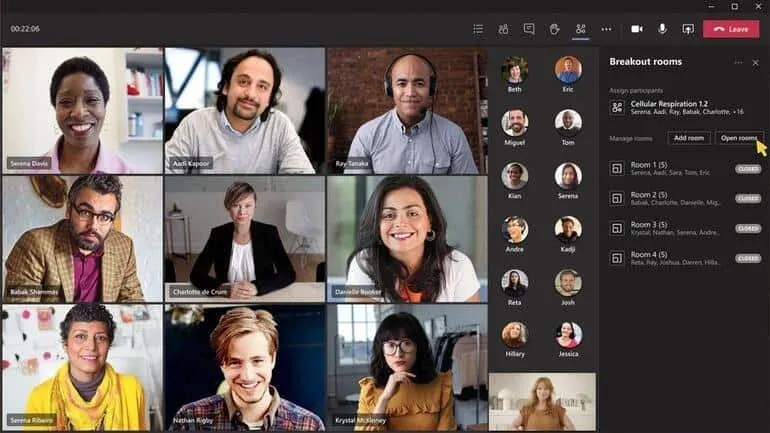
- Microsoft Teams will get better support for webinars later this year, including automated emails to make it easier to manage presence, and reporting tools to understand participant engagement.
- The contactless meeting experiences allow employees to navigate conversations using voice and gesture-based interactions, using Microsoft’s Cortana Voice Assistant and Surface Hub
- Notifications about the capacity of meeting rooms enabled by meeting room cameras track the number of people in a physical meeting room so they don’t exceed capacity, allowing organizations to adhere to social distance guidelines.
- A new set of devices called Microsoft Teams Panels will be available at Crestron and Yealink in early 2021. These are designed to be mounted outside the meeting rooms to provide information on the availability and bookings of rooms on site.
Calls
- A simplified view for the Microsoft Teams calling experience shows contacts, voicemail, and history in one place.
- The new joint calling feature is designed with IT helpdesks and administrative hotlines in mind and allows Teams users to add a queue to a Teams channel. Administrators can then easily link queues to specific channels.
- Starting October 1, Microsoft is expanding Microsoft Calling to include Austria, Denmark, Italy, Portugal, Sweden and Switzerland.
Chat and collaboration
- A new information window, pinned messages, and a conversation button are added to Teams to highlight important posts pinned by members and other relevant information shared in a Teams channel.
- Later this year, Teams will add a new AI-based search experience to make it easier and faster for users to find people, messages, and files across all Microsoft 365 services. Microsoft is also increasing the membership limit for teams from 10,000 to 25,000 members.
- Microsoft Lists has been added to Teams for commercial and government customers, making it easier for businesses to track, manage, and organize important jobs.
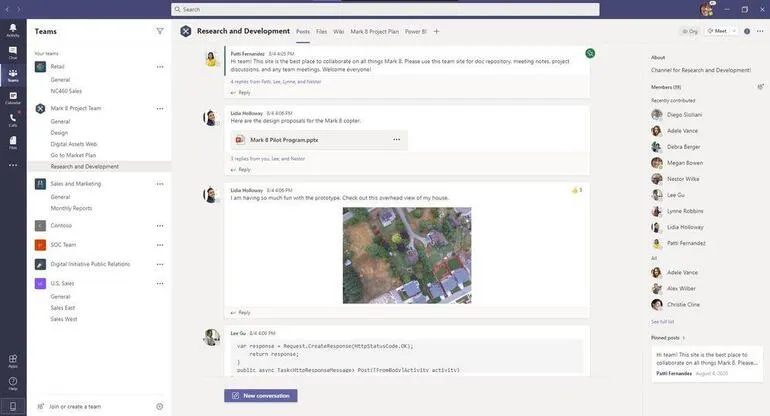
The new information window provides an overview of important information in a chat channel at a glance
Microsoft 365 integrations
- Well-being features and productivity insights will come to Microsoft Teams from October. Powered by MyAnalytics and Workplace Analytics, these are designed to help managers and organizational leaders understand employee well-being and better support the needs of their staff. A “virtual commute” to give structure to the employees’ days, as well as guided meditations through Headspace, are also added.
- A new SharePoint homepage app helps Teams connect directly to their organization’s intranet and provides quick access to company news and information.
Firstline Workers
- Walkie Talkie Android is a new feature for frontline employees who turn Company-owned Android handsets or tablets and personal Android phones or tablets into a walkie-talkie using a simple push-to-talk feature. Voice calls are facilitated securely in the cloud.
- New integration between Microsoft Teams and RealWear’s head-mounted devices allows field workers to make hands-free calls in hazardous environments.
- The new Power Automate Shifts connector for Teams is part of the Power Platform suite and enables managers to more easily manage shift work and schedules with automatic approval functionality and integration with calendars, including Outlook.
Health care
- With a new connector, healthcare organizations can start virtual consultations with patients or colleagues in Teams, directly from their electronic patient record (EPD). Epic, an American HEALTHCARE IT provider, will be the first to integrate with Teams in 2020, and soon support for other EHR systems will be available.
- Teams will also integrate with Nuance Dragon Ambient eXperience (DAX), an AI-powered clinical documentation tool that allows healthcare professionals to safely record interactions between clinicians and patients during telecare consultations and then automatically generate clinical notes. This is currently in private beta.
Security and compliance
- Microsoft Teams customer key support is added to enable administrators to encrypt Team data while in the data center. A public preview is expected before the end of the year.
- The new Microsoft Graph API for Teams DLP is now available, allowing developers to build apps that can include Team messages for data loss prevention (DLP) scenarios for both Teams customers and software vendors.
- The Export API teams allow messages sent in Teams chats – including attachments and other shared media such as GIFs and stickers – to be exported in accordance with the organization’s data retention, indexing, classification, and regulatory policies.
Management
- IT administrators will soon be able to customize their business app catalog to suit their organization’s corporate identity.
- New bulk policy assignments allow administrators to control which Teams features are available to users in batches of up to 50,000 users at a time. At the same time, a new role as delegated device administrator enables global administrators to limit and manage permission for other Team management functions.
- Microsoft is releasing a dedicated Teams app for ARM-based devices to improve performance.
Power Platform and custom development
- Developers will soon be able to integrate their apps into Teams to bring additional functionality to the platform during meetings. Apps from more than 20 launch partners will be ready for use when the feature becomes widely available in October, Microsoft said.
- Team approvals become generally available in October, allowing Teams users to create and unsubscribe documents directly from a chat or channel call. Integrations with Adobe Sign and DocuSign are expected before the end of the year.
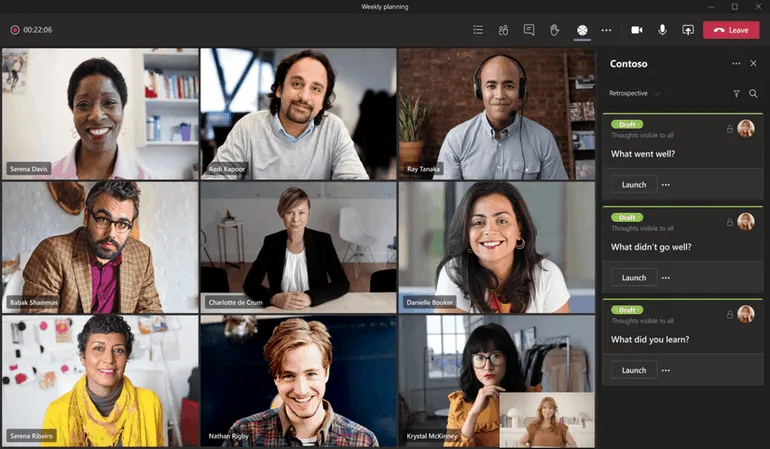
- Later this year, there will be a new Power Automate app for Teams with a new set of templates for automating work in Teams. Microsoft’s Power BI app for Teams is also getting a boost, meanwhile GitHub has launched a new version of its GitHub for Teams app.
- Developers will soon be able to build Power Platform connectors with Azure API Management and Azure Functions for all Microsoft-hosted third-party apps, legacy, or industry apps.
- Single sign-on (SSO) for Teams apps is now available through the Azure Active Directory, with support for chatbots and other message extensions.
Source: The Republic
Want to know more?

Related
blogs
Tech Updates: Microsoft 365, Azure, Cybersecurity & AI – Weekly in Your Mailbox.


![Sensitive Information in AI Chat, Teams, and WhatsApp: The Moment Before Sending /
Hero Voor Verzenden.html
HTML
maak synccommanodo
Je stuurde de HTML-bron, niet de PNG. Ik heb die HTML zelf gerenderd en het resultaat bekeken. Het beeld is akkoord.
Wat ik heb gecontroleerd
Maat en fonts: exact 1200x900. Halogen 900 en Bilo 300 en 500 laden uit het bestand zelf, zonder vervangend lettertype.
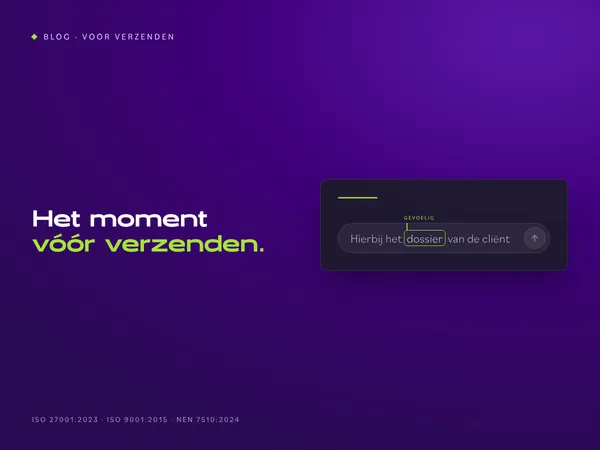
Inhoud: kicker “BLOG · VOOR VERZENDEN”, de kop in wit en limoengroen, en de chatkaart met “dossier” omlijnd en het label “gevoelig”. Er is geen maskering en er staan geen merknamen in.
Opmaak: de kop raakt de kaart niet en de certificeringsregel is volledig.
Randen: de hoekpixels zijn paars, niet de controlekleur
#160a2e. Er is dus geen rand van de pagina mee geëxporteerd.
Het PNG-bestand gevoelige-gegevens-ai-chat-verzenden.png heb ik je gestuurd. Zet het in je Downloads en draai dan:
powershell
cd C:\repos\ALTA-ICT
git pull --rebase
$b = "docs\Projecten\social-campagnes\Week 43 - Voor Verzenden\Blog"
$f = Get-Item "$env:USERPROFILE\Downloads\gevoelige-gegevens-ai-chat-verzenden.png"
Add-Type -AssemblyName System.Drawing
$i = [System.Drawing.Image]::FromFile($f.FullName); "{0}x{1}" -f $i.Width, $i.Height; $i.Dispose()
Copy-Item $f.FullName "$b\" -Force
git add -- "$b\gevoelige-gegevens-ai-chat-verzenden.png"
git diff --cached --name-only
git commit -m "Blog 43: bloghero gevoelige gegevens voor verzenden"
git log origin/master..master --oneline
Verwachting: 1200x900, dan één bestandsnaam, daarna één of twee commits. Twee commits als de editie 15-hero nog niet gepusht is. Plak de output terug, daarna push je.
In WordPress, bij blog 43:
Uitgelichte afbeelding: upload dit bestand, met de alt-tekst uit de plakklaar.
Controleer na het uploaden dat de bestandsnaam geen -1 heeft gekregen.
De kanaalvarianten van blog 43 maak je pas als de blog live staat. De prompt staat in de plakklaar.
geef me blog 43 om te maken zoals het moet in wordpress
Hieronder staat alles voor WordPress, in de volgorde van de editor. Ik gebruik variant B, zonder test. Plak elke HTML in het tabblad Tekst en schakel nooit over naar Visueel.
1. Nieuw bericht
Ga naar Berichten, Nieuw bericht.
2. Titel
Gevoelige gegevens in AI-chat, Teams en WhatsApp: het moment vóór verzenden
3. Veld Introductie (tabblad Tekst)
html
<p dir="ltr">Bij een datalek denk je aan een hacker. In de praktijk begint het vaak met Ctrl+V: een stuk uit een dossier in de verkeerde chat, de verkeerde mail, of een AI-tool die de tekst "even netjes maakt".</p>
<p dir="ltr">Er is geen kwade wil. Er is haast, en een knop die te dichtbij zit. Deze blog gaat over dat ene moment vlak voor verzenden: wat kun je dan nog tegenhouden, en wie ziet het?</p>
4. Veld Omschrijving (tabblad Tekst)
html
<h2>Waar Microsoft 365 ophoudt</h2>
<p dir="ltr">In <a href="https://alta-ict.nl/blog/microsoft-purview-business-premium/">de blog over Microsoft Purview</a> zag je wat Business Premium al beschermt: mail en de bestanden in OneDrive en SharePoint. Een bestand dat je in Teams deelt, valt daar ook onder.</p>
<p dir="ltr">Het chatbericht in Teams niet. DLP voor Teams-chat vraagt volgens Microsoft een E5-licentie. En een AI-chat in de browser of een app op de laptop ziet Microsoft helemaal niet.</p>
<h2>AI-chat en geheimhouding</h2>
<p dir="ltr">Een medewerker plakt een brief aan een cliënt in een gratis AI-chat, met zijn privéaccount, om hem beter te formuleren. Naam, adres en de reden van het dossier gaan mee, naar een dienst waarmee je organisatie geen verwerkersovereenkomst heeft.</p>
<p dir="ltr">Verbieden werkt slecht. De tool blijft handig, en wie hem niet mag gebruiken, gebruikt hem stiekem. Beter: weten welke AI-tools je team gebruikt, en per tool afspreken wat erin mag.</p>
<h2>WhatsApp is geen dossier</h2>
<p dir="ltr">De wijkverpleegkundige stuurt een foto naar de collega die de dienst overneemt. De installateur appt de klant een offerte met diens adres. Het werkt snel, en het gebeurt vaak op een privételefoon.</p>
<p dir="ltr">Daarmee staan zakelijke gegevens op een apparaat dat de organisatie niet beheert, in een app die ze niet kan archiveren. Vertrekt de medewerker, dan vertrekken de gesprekken mee. Een alternatief moet net zo snel zijn, anders gebruikt niemand het.</p>
<h2>Een waarschuwing op het juiste moment</h2>
<p dir="ltr">Een training over datalekken vergeet je in een week. Een melding op het moment van verzenden niet. In Outlook kan Microsoft 365 dat al: staat er een gevoelig gegeven in een mail, dan verschijnt bovenaan een melding nog voor de mail vertrekt. Voor chat en voor apps buiten Microsoft heb je daarvoor software op het apparaat nodig.</p>
<h2>Beschermen zonder meekijken</h2>
<p dir="ltr">Elke vorm van datalekpreventie roept bij medewerkers en ondernemingsraad één vraag op: leest de werkgever mee? Stel die vraag zelf, vóór je iets kiest. Een melding per soort gegeven is genoeg om een lek te voorkomen. Namen en berichtinhoud zijn daarvoor niet nodig.</p>
<h2>Begin met een AI-overzicht</h2>
<p dir="ltr">Je hoeft niet met software te beginnen. Begin met een lijst van de AI-tools die je team gebruikt, waarvoor, en met welke gegevens. Vaak staan er tools op die niemand had verwacht.</p>
<p dir="ltr">De Europese AI-verordening legt de markering van AI-output bij de aanbieders. Sinds augustus moeten zij wat hun AI maakt machineleesbaar markeren; voor tools die al eerder op de markt waren, loopt de overgang tot 2 december. Dat is hun plicht. Jouw taak is weten wat je gebruikt.</p>
<p dir="ltr">Het <a href="https://airegister.alta-ict.nl/?utm_source=blog&utm_medium=referral&utm_campaign=voorverzenden&utm_content=blog43-tool">AI-Register</a> geeft geen juridisch oordeel. Wel maakt het in ongeveer tien minuten een overzicht van je AI-tools met de transparantieteksten, als drie documenten in je mail.</p>
<h2>Zo doen wij het</h2>
<p dir="ltr">We beginnen met het AI-overzicht en de afspraken per tool. Daarna zetten we Purview aan voor mail en bestanden. Het gat buiten Microsoft vullen we met datalekpreventie op het apparaat, als add-on bij de moderne werkplek. We werken zelf onder ISO 27001:2023, ISO 9001:2015 en NEN 7510:2024.</p>
<h2>Veelgestelde vragen</h2>
<p dir="ltr"><strong>Mag een medewerker een AI-chat gebruiken voor werk?</strong></p>
<p dir="ltr">Dat bepaal je zelf, per tool. Leg vast welke tools mogen en welke gegevens er niet in horen. Een zakelijk abonnement met een verwerkersovereenkomst is iets anders dan een gratis versie met een privéaccount.</p>
<p dir="ltr"><strong>Beschermt Business Premium Teams?</strong></p>
<p dir="ltr">Bestanden die je in Teams deelt wel, want die staan in SharePoint of OneDrive. Het chatbericht zelf niet; daarvoor vraagt Microsoft E5.</p>
<p dir="ltr"><strong>Moet ik AI-output zelf markeren?</strong></p>
<p dir="ltr">De markering van AI-output is een plicht van de aanbieder van de AI-tool. Voor jou telt dat je weet welke tools je gebruikt en wat je erin stopt.</p>
<h2>Conclusie</h2>
<p dir="ltr">Het lek begint met plakken, niet met een hacker. Microsoft 365 beschermt mail en bestanden; de chat, de AI-tool en de app op de laptop vallen erbuiten. Begin met een overzicht van wat je team gebruikt en spreek per tool af wat erin mag.</p>
<p dir="ltr">Wil je het moment vóór verzenden bespreken? Plan een gesprek met ALTA-ICT.</p>
5. CTA-knop (als je thema een knopveld heeft)
Tekst: Het moment vóór verzenden bespreken
Link: https://alta-ict.nl/contact?utm_source=blog&utm_medium=referral&utm_campaign=voorverzenden&utm_content=blog43-cta
6. Uittreksel
Een datalek begint vaak niet bij een hacker, maar bij plakken. Wat er gebeurt als een medewerker gegevens in een AI-chat, een Teams-chat of WhatsApp zet, waar Microsoft 365 ophoudt, en waarom je begint met een overzicht van de AI die je team gebruikt.
7. Categorie: Beveiliging. Zet geen andere categorie aan.
8. Uitgelichte afbeelding
Upload gevoelige-gegevens-ai-chat-verzenden.png. Controleer daarna dat de bestandsnaam in de mediabibliotheek geen -1 heeft gekregen.
Alt-tekst:
Hero bij de blog over gevoelige gegevens vóór verzenden: een chatinvoerveld met de zin Hierbij het dossier van de cliënt, waarin het woord dossier omlijnd is en gemarkeerd als gevoelig.](/media/uploads/2026/10/gevoelige-gegevens-ai-chat-verzenden.png?width=600)