
Knowledge base
August 20, 2026
Switching IT Providers: From Initial Hesitation to a Smooth Migration
A director called us with one question: “Can you take over from our current IT provider?” Our first follow-up question is always the same: In whose name is your Microsoft tenant registered? There was silence. He looked into it: the tenant was registered in the name of his IT provider. So was the domain. The administrator accounts, the firewall, the backups—everything. He owned his company, but he was merely a tenant of his own data.
He could have switched, but every step involved going through the very party he wanted to leave. That cost him extra months and required him to remain friendly toward people he was angry with.
In this blog, you’ll learn how to stay one step ahead of that situation: the ownership check that takes ten minutes, the signs that your IT partner is quietly drifting away from you, the questions you should ask them, the timeline for a switch, and how to carry out a migration without your company even noticing.
Whose name is your tenant under?
You don’t have to be planning to switch to check this, and it takes ten minutes. Three questions: Who is the Global Admin in your Microsoft 365 environment, and in whose name is the tenant registered? Who is the owner of your domain name with your registrar? And where are your backups stored, and can you access them without your provider? The answers will tell you whether you’re a customer or a prisoner.
You can get the answer to the first question without making an appointment. Our free Tenant Check at tenant.alta-ict.nl analyzes your Microsoft 365 environment and shows, among other things, which administrator accounts exist. Just to be clear up front: the check doesn’t identify or resolve any issues, it doesn’t store any of your data, and it doesn’t answer questions about the ownership of your domain or backups; you’ll need to ask your registrar and your provider about those.
Five Signs That Your IT Partner Is Leaving You
“Isn’t that how it works everywhere?” said an entrepreneur when we asked how his IT was set up. He had to call in himself whenever there was a glitch, the invoice grew every quarter with line items no one could explain, and his question about security was brushed off with, “You don’t have the budget for that.” He thought that was normal. It’s not normal. These are signs that your IT partner is starting to drift away from you—without saying so:
You have to keep calling to follow up on your own issues. The bill keeps growing, but the explanations don’t. Security questions are brushed off. There’s no more advice—just putting out fires. And your regular contact person is no longer there.
You don’t notice good IT. If you notice your IT every week, that says something. If you recognize two or more signs, you don’t have to make a decision just yet, but you should start keeping track.
Turn the questionnaire over
In a previous blog post, we wrote about the questionnaire your major client is sending you now that the Cybersecurity Act is in effect. Here’s the question: have you ever sent that questionnaire to your own IT provider? Think about it: your IT provider has administrative access to your email, your files, your financial systems, and your customer data. If they get hacked, you get hacked. Your chain of responsibility doesn’t start with your cleaning company; it starts with the party that has the highest privileges.
One question is enough to get started: “May I see your ISO 27001 certificate?” Pay attention to the answer. A certified provider will send you a PDF with a certificate number that you can verify yourself. An uncertified party will start talking about “we operate according to the principles of.” Principles aren’t proof, and the law requires proof.
The Five Questions to Ask Your Supplier
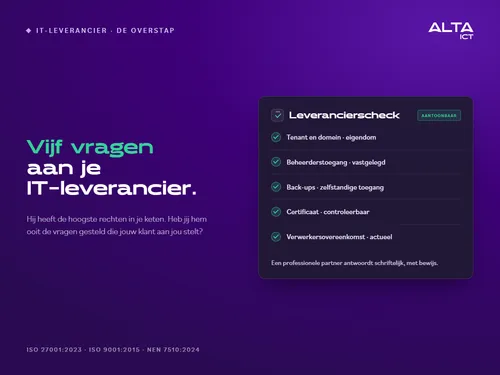
If you want to take a more comprehensive approach, ask these five questions in writing: In whose name are our Microsoft 365 tenant and our domain registered? Who has administrator access to our systems, and where is that documented? Where are our backups stored, and can we access them independently? What certification can you provide with a verifiable certificate? And is our data processing agreement up to date, and does it cover the current services?
A professional IT partner will answer these questions within a week, in writing and with supporting evidence. The answer itself is information, but the way it’s presented tells you just as much.
The calendar: January 1 begins in August
“Switching providers? We’ll do that sometime next year.” Do the math. If you want to switch as of January 1, many management contracts require a notice period of several months, so you’ll need to give notice well before the end of the year. A careful migration requires weeks of preparation, so your new provider needs to be able to start in the fall. And you can’t choose a provider in just a week: quotes, meetings, and references take time.
If you count back from January 1, you’ll end up in the summer. Anyone who doesn’t start looking around until the fall will sign a contract amid the December rush that they’ll regret in January. So put those quiet weeks to good use: not to make a decision, but to run a property check and request one quote for comparison. Then you can make your decision based on facts rather than frustration.
Switching Providers Without the Hassle: Four Steps
Switching IT providers sounds like renovating a store while it’s still open for business. It doesn’t have to be that way. A careful transition takes place in four phases. First, the assessment: mapping out the environment and drawing up the handover list with your current provider. Next comes the preparation: accounts, licenses, and security are set up alongside your existing environment, and you won’t even notice it. Then comes the migration itself, which takes place outside of business hours, so that everyone can continue working as usual on Monday morning. And finally, the follow-up: a dedicated point of contact, direct communication channels, and an evaluation.
Your data remains yours before, during, and after the transition. This should be specified in the data processing agreement and in your new provider’s offboarding policy.
You can tell a supplier by the way they say goodbye
We ourselves have transferred clients to other IT providers. Not because things went wrong; sometimes paths diverge—it happens. And that’s precisely when you see what a supplier is made of. A proper handover includes: complete documentation of the environment, all administrator passwords stored in a secure vault, license overviews, backup history, and a smooth transition with the new provider at the table. The data processing agreement properly terminated, data destruction documented. No delays, no “we’ll figure that out later,” no invoice for assisting with your own departure.
So at your next contract meeting, ask: “What happens if we ever want to leave?” The answer to that question will tell you more than the entire proposal. Anyone who has clearly defined exit terms in their contract has nothing to hide during the partnership.
ALTA-ICT’s Position on This Matter
As an MSP, we are subject to the Cybersecurity Act and are certified to ISO 27001:2023, ISO 9001:2015, and NEN 7510:2024. We answer the five questions above with documentation, not just promises, and we include our certificates with every quote without being asked. If you have doubts about your current provider’s answers, we’ll conduct an independent second opinion on your IT environment—even if the conclusion is that you’re perfectly fine where you are.
Frequently Asked Questions
How do I check whose name my tenant and domain are registered under?
The tenant: Check your Microsoft 365 admin portal to see who the Global Admin is, or have it displayed via a tenant check. The domain: Ask SIDN or your registrar who is listed as the registrant. If it’s registered in your provider’s name, request in writing that it be transferred to your own organization.
Can my supplier refuse to cooperate with a switch?
Your contract and the data processing agreement set the rules, but your data is and remains yours. A professional party will cooperate in a documented manner during the transfer; therefore, make sure to set out the terms regarding offboarding before you sign, not when you’re ready to leave.
How long does a transfer take?
Expect the process to take anywhere from a few weeks to a few months, depending on the scope of the project and the current state of the environment. Most of the time is spent on careful preparation; the migration itself takes place outside of business hours.
Will my employees notice anything about the migration?
With the right approach, virtually nothing: the new environment is set up alongside the existing one, and the transition takes place outside of office hours, so that everyone can continue working as usual on Monday morning.
Should I switch if I recognize two of the five signs?
No. These signs are a reason to start evaluating your options and asking questions, not to cancel right away. Sometimes, a good conversation with your current provider is all it takes; the five questions in this blog post provide an excellent framework for that.
Conclusion
Most business owners don’t think about their IT provider until frustration reaches a peak, and that’s exactly the wrong time: you end up making a decision under pressure and based on the provider you want to get rid of. Do it the other way around. Assess the situation now while things are calm, ask the five questions, and then make your decision based on facts. And whatever the outcome may be: a provider who answers the questions with evidence and has made arrangements for the transition is one worth keeping.
Would you like an independent second opinion on your IT environment? Schedule a short session with ALTA-ICT, and we’ll go through the five questions together.
Want to know more?
Related
blogs

Tech Updates: Microsoft 365, Azure, Cybersecurity & AI – Wekelijks in je Mailbox.