
Knowledge base
February 25, 2025
How does Microsoft Purview Insider Risk Management work?
Internal threats pose a major risk to organizations. More than 60% of data breaches come from within – often without employees being aware of it. But how do you prevent sensitive information from falling into the wrong hands without distrusting your team?
That’s where Microsoft Purview Insider Risk Management¹ comes in! This powerful tool detects, analyzes and minimizes internal risks with smart AI technology.
How exactly does it work?
1️⃣ Detecting risk with smart AI
Microsoft Purview uses machine learning and behavioral analysis to detect suspicious activity. This means the system can recognize anomalies in normal user behavior, such as:
Large amounts of data suddenly moved (e.g., to a USB drive or external cloud storage)
Unusual emails with sensitive attachments sent to private addresses
Attempts to access documents that a user does not normally have permissions to access
Unexpected file transfers inside or outside the network
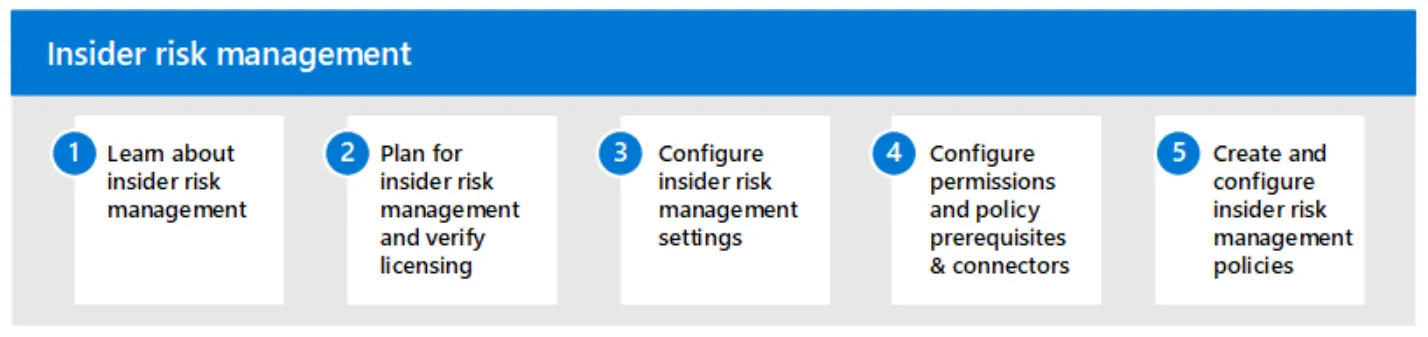
Steps to set up insider risk management for your organization Source: Microsoft
2️⃣ Understanding context and preventing false alarms
Not every action is immediately suspicious. Microsoft Purview analyzes context to prevent false alarms. For example:
✅ Is it a legitimate job? – An employee in HR needs access to personnel files, while someone in IT does not.
✅ Is the behavior aberrant? – If someone suddenly downloads large amounts of data without a normal fit to their job, that may trigger an alert.
✅ Are multiple suspicious signals being combined? – A single action may not be a problem, but multiple signals combined may indicate a threat.
Through these smart analytics, Microsoft Purview prevents unnecessary alarms and maintains employee privacy.
3️⃣ Minimize risk with automated notifications and actions
When a potential risk is detected, you can set up automatic alerts and even take preventive measures, such as:
Alerts to security teams so they can act immediately
Temporarily revoke access privileges for suspicious activity
Insights and reports to recognize patterns and adjust policies
Set custom security measures, such as blocking external transfers
4️⃣ Privacy and compliance ensured ✅
Microsoft Purview ensures that this is all done without violating employee privacy. The tool works with anonymized data, and only authorized security staff can perform deeper analysis when really necessary.
Moreover, the system meets strict compliance regulations such as GDPR, keeping your organization protected from legal and reputational risks.
Why choose Microsoft Purview?
With Microsoft Purview , you make your security proactive rather than reactive. This means you don’t intervene only when it’s too late, but spot and minimize risks early on.
Smart AI and behavioral analytics
No impact on privacy and productivity
Automatic alerts and preventive measures
Fully integrated within Microsoft 365 and Azure
Protect your organization today!
Internal threats are a reality, but with the right tools, you can manage them effectively. Want to know how Microsoft Purview Insider Risk Management makes your organization more secure?
Get in touch or test it yourself!
References
¹https://learn.microsoft.com/purview/insider-risk-management-solution-overview
About the author
My name is Alta Martes, a specialist in Microsoft 365 and Google Workspace, with a focus on modern workplace management, cloud security and identity & access management. With years of experience, I help organizations optimize their IT infrastructure and create a secure, efficient digital workplace.
Need help with your Microsoft 365 strategy?
Click below and find out how we can support your organization:
Want to know more?

Related
blogs

Tech Updates: Microsoft 365, Azure, Cybersecurity & AI – Wekelijks in je Mailbox.