
Knowledge base
September 16, 2026
Inside Your Microsoft 365 Environment: Three Questions to Ask Your Administrator This Week
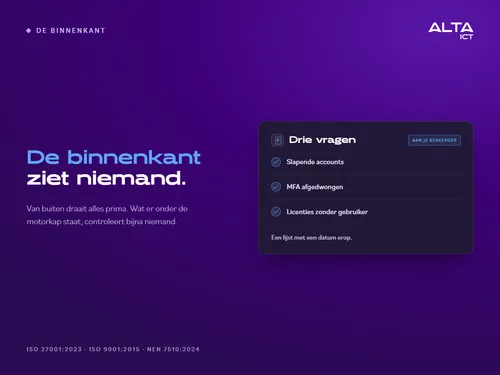
“That’s taken care of” is a feeling. A list with a date on it is an answer. That difference is what this blog is all about.
You can check the exterior of your domain from the street, and two out of three domains don’t make the cut there. But suppose your front door *is* locked: the certificate is valid, email is secure, and the headers are in order. That’s when the real story begins. Inside, accounts belonging to former employees are still active. Inside, some administrators aren’t required to use MFA. Inside, you’re paying for licenses for people who left last year. No one sees the inner workings of your Microsoft 365 environment—until someone gains access.
What we find during intakes is very similar, and you can take care of most of it in an afternoon. Below are the three questions to ask your own administrator this week, why “MFA is on” is the most misleading phrase in Microsoft 365, and two important dates from Microsoft this fall.
Question 1: Which accounts haven’t been logged into for 90 days, and why are they still active?
Any existing account can be exploited. An account belonging to a former employee, a student who interned last year, or a vendor whose project was completed long ago—these accounts often still have a password, sometimes even permissions, and no one is monitoring them. But an attacker does. A dormant account is the stealthiest entry point there is, because no one notices if it behaves like someone else.
The question to ask your administrator isn’t “Are there any dormant accounts?”, but “Which ones, and why are they still active?” The answer is a list with dates on it. Anything that shouldn’t be on that list needs to be deactivated or removed.
Question Two: For whom is MFA mandatory, and under which regulation?
“MFA is enabled” is the most misleading phrase in Microsoft 365. “Enabled” can mean: available, but optional. Security defaults are turned off, there’s no Conditional Access, and some of your coworkers have never set it up. On paper, MFA is enabled. In practice, the door is left ajar.
“Enforced” means that no one can log in without two-factor authentication—not even management. Especially not management, because those accounts are the target. You can’t tell the difference by feel, but you can see it in your tenant: there’s either a Conditional Access rule or security defaults that enforce it, and your administrator can specify that rule. If they can’t, then the answer is “available,” not “enforced.”
When considering this same question, be sure to include the administrators as well. Every administrator account is a key to your entire environment. During onboarding, we regularly see more administrators than there are people who perform daily administrative tasks, and this group includes former employees, vendors, and test accounts. We recommend a small, fixed number of accounts, with mandatory MFA and no daily use; Microsoft recommends the same.
Question 3: How many paid licenses have no user?
In virtually every environment we review, we find paid Microsoft licenses with no users associated with them. Employees who have left the company. Duplicate subscriptions. Advanced features that no one uses, alongside standalone tools that do the same thing.
“Security costs money,” we often hear. That’s true. At most companies, the well-organized list of licenses covers the entire security infrastructure. Your budget is already there. It’s just leaking away. And the answer to this question is, once again, a list with a date on it—not a gut feeling.
Two Microsoft Dates to Watch This Fall
Since September 1, passkeys have been the default method for signing in to Microsoft 365. Anyone who currently uses an SMS code will see a prompt asking them to switch. If you see that prompt appear on a colleague’s screen, it’s not a phishing attempt—but it’s time to stop clicking it away.
On October 1, Microsoft will close the old gateway to your mailbox: Exchange Web Services. Any connections that haven’t been migrated by then—such as an old CRM connection, Mail on a Mac, or a scanner—will simply stop working. The deadline for the exception allowing uninterrupted service was August 31; after that, service will only be available once the connections have stopped working on October 1. On April 1, 2027, the service will be permanently shut down for everyone. Ask your administrator—if you’d like to add one—which integrations still use EWS?
Measuring the interior in two minutes
You can ask these three questions. You can also have them assessed. The ALTA-ICT Tenant Check analyzes your Microsoft 365 environment and, in two minutes, shows you your MFA coverage, the number of administrator accounts, your Secure Score, and the licenses you’re paying for but not using.
Three things to note upfront, because a check that examines your environment requires trust. It requires an administrator account; without read access to your directory, it cannot count anything, and with a read-only account, several checks will return empty results. It does not count administrators who can only activate their role via PIM; this is also noted in the report. And it doesn’t store anything from your tenant: no names, no email addresses, no tokens. It counts and calculates in RAM, displays the result, and forgets the underlying data. What is retained for twelve months: the contact information you provide yourself and the scores as numerical values. This is stated at tenant.alta-ict.nl/privacy, and a test currently in the pipeline enforces this.
How ALTA-ICT helps
The three questions yield three lists, and those lists amount to an afternoon’s work: deactivated accounts, MFA enforced via a policy, reduced number of administrators, and licenses cleaned up. We do this as part of our ongoing management or as a one-time task, with a before-and-after report that you keep as evidence. That evidence is exactly what a chain of evidence regarding access will require of you later: not “MFA is enabled,” but the policy, the date, and the coverage. We operate in accordance with ISO 27001:2023, ISO 9001:2015, and NEN 7510:2024.
Frequently Asked Questions
We have MFA enabled. Isn’t that enough?
Only if it is enforced through security defaults or a Conditional Access rule. If your administrator cannot specify that rule, MFA is available but not enforced.
How many administrators are too many?
More than the number of people who actually perform administrative tasks. Every additional administrator account is another key to everything. Keep it small, enforce MFA, and don’t use them for day-to-day work.
Why does Tenant Check need an administrator account?
Because without read access to your directory, it cannot count administrators, MFA coverage, or licenses. With a read-only account, several checks will show as empty, and that is reflected in the report.
What information does Tenant Check store?
Only the contact information you provide yourself and the scores as numbers, for twelve months. Nothing from your tenant itself: no names, email addresses, or tokens.
If I could do only one thing, what should I do first?
Enforce MFA through a policy that applies to everyone, starting with administrators and management. This blocks the most commonly used entry point, and it doesn’t require a license.
Conclusion
You can see the outside from the street. No one sees the inside of your Microsoft 365 environment until they’re inside. Three questions for your administrator, three lists with dates on them, and an afternoon’s work: that’s the difference between being organized and being accountable.
If you want to see the results without waiting for your administrator, run the Tenant Check at tenant.alta-ict.nl. If you want to know what the results mean for your organization, schedule a check-in with ALTA-ICT.
Want to know more?
Related
blogs
Tech Updates: Microsoft 365, Azure, Cybersecurity & AI – Wekelijks in je Mailbox.