Knowledge base
November 10, 2020
Microsoft Teams phishing attack targets Office 365 users.
Up to 50,000 Office 365 users will be targeted by a phishing campaign that claims to notify them of a “missed chat” from Microsoft Teams.
Researchers warn of a phishing campaign posing as an automated message from Microsoft Teams. In reality, the attack is intended to steal the login credentials of Office 365 recipients.
Teams is Microsoft’s popular collaboration tool, which has grown in popularity among external employees during the pandemic, making it an attractive brand for attackers to pose. This particular campaign has been sent to between 15,000 and 50,000 Office 365 users, according to investigators from Abnormal Security on Thursday.
“Because Microsoft Teams is an instant messaging service, recipients of this notification may be more likely to click on it, so they can quickly respond to any message they think they missed based on the notification,” researchers said in an analysis thursday.
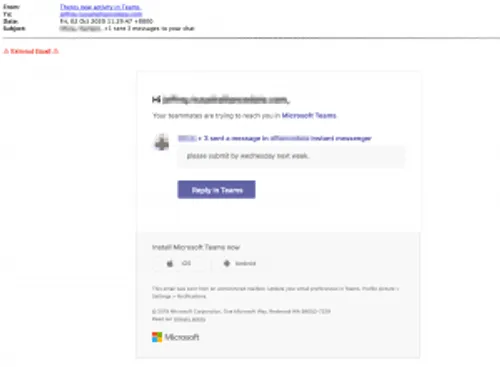
The first phishing email contains the name “There’s new activity in Teams,” making it look like an automatic notification from Microsoft Teams.
As seen in the image below, the email tells the recipient that their teammates are trying to reach them, alerting them that they missed Microsoft Team chats, and showing an example of a teammate chat asking them to submit something before Wednesday of next week.
Erin Ludert, data scientist at Abnormal Security, told Threatpost researchers that attackers here are using more of a “spray” tactic because the employee referenced in the chats does not appear to be an employee of the company that received the attack.
To respond, the email encourages the recipient to click the “Respond in Teams” button. However, this leads to a phishing page.
“In the body of the email there are three links that appear as ‘Microsoft Teams’, (contact) has sent a message in instant messenger ‘and ‘Respond in teams’, according to researchers. If you click on one of these, you’ll find a fake website that mimics Microsoft’s login page. The phishing page asks the recipient to enter his email address and password. “
Researchers said the phishing landing page also looks convincingly like a Microsoft login page, with the beginning of the URL containing “microsft teams.” If recipients are convinced to enter their Microsoft credentials on the page, they unknowingly surrender them to attackers, who can then use them for a variety of malicious purposes, including taking over accounts.
The ongoing pandemic has raised concerns about cyber attackers using business-friendly collaboration brands such as Microsoft Teams, Zoom and Skype. In May, a convincing campaign posing as reports from Microsoft Teams to steal employees’ Office 365 login credentials circulated, with two separate attacks targeting as many as 50,000 different Teams users.
Microsoft is at the top when it comes to impersonating hackers – with Microsoft products and services occurring in nearly a fifth of all global brand phishing attacks in the third quarter of this year. Attackers also use advanced tactics, including visual CAPTCHAS to target Office 365 users and token-based authorization methods.
To respond, the email encourages the recipient to click the “Respond in Teams” button. However, this leads to a phishing page.
“In the body of the email there are three links that appear as ‘Microsoft Teams’, (contact) has sent a message in instant messenger ‘and ‘Respond in teams’, according to researchers. If you click on one of these, you’ll find a fake website that mimics Microsoft’s login page. The phishing page asks the recipient to enter his email address and password. “
Researchers said the phishing landing page also looks convincingly like a Microsoft login page, with the beginning of the URL containing “microsft teams.” If recipients are convinced to enter their Microsoft credentials on the page, they unknowingly surrender them to attackers, who can then use them for a variety of malicious purposes, including taking over accounts.
The ongoing pandemic has raised concerns about cyber attackers using business-friendly collaboration brands such as Microsoft Teams, Zoom and Skype. In May, a convincing campaign posing as reports from Microsoft Teams to steal employees’ Office 365 login credentials circulated, with two separate attacks targeting as many as 50,000 different Teams users.
Microsoft is at the top when it comes to impersonating hackers – with Microsoft products and services occurring in nearly a fifth of all global brand phishing attacks in the third quarter of this year. Attackers also use advanced tactics, including visual CAPTCHAS to target Office 365 users and token-based authorization methods.
Source: threatpost
Want to know more?
Related
blogs
Tech Updates: Microsoft 365, Azure, Cybersecurity & AI – Weekly in Your Mailbox.

![Sensitive Information in AI Chat, Teams, and WhatsApp: The Moment Before Sending /
Hero Voor Verzenden.html
HTML
maak synccommanodo
Je stuurde de HTML-bron, niet de PNG. Ik heb die HTML zelf gerenderd en het resultaat bekeken. Het beeld is akkoord.
Wat ik heb gecontroleerd
Maat en fonts: exact 1200x900. Halogen 900 en Bilo 300 en 500 laden uit het bestand zelf, zonder vervangend lettertype.
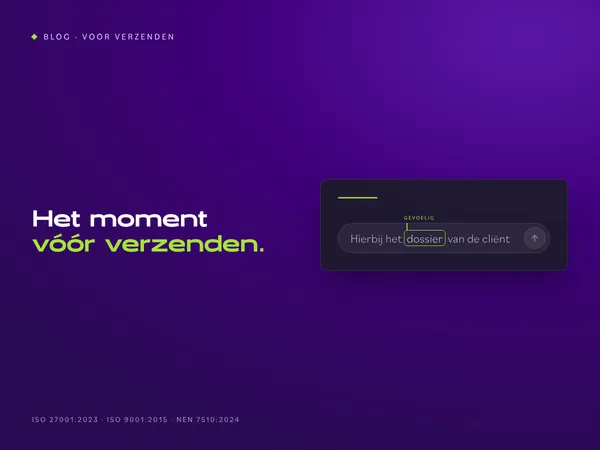
Inhoud: kicker “BLOG · VOOR VERZENDEN”, de kop in wit en limoengroen, en de chatkaart met “dossier” omlijnd en het label “gevoelig”. Er is geen maskering en er staan geen merknamen in.
Opmaak: de kop raakt de kaart niet en de certificeringsregel is volledig.
Randen: de hoekpixels zijn paars, niet de controlekleur
#160a2e. Er is dus geen rand van de pagina mee geëxporteerd.
Het PNG-bestand gevoelige-gegevens-ai-chat-verzenden.png heb ik je gestuurd. Zet het in je Downloads en draai dan:
powershell
cd C:\repos\ALTA-ICT
git pull --rebase
$b = "docs\Projecten\social-campagnes\Week 43 - Voor Verzenden\Blog"
$f = Get-Item "$env:USERPROFILE\Downloads\gevoelige-gegevens-ai-chat-verzenden.png"
Add-Type -AssemblyName System.Drawing
$i = [System.Drawing.Image]::FromFile($f.FullName); "{0}x{1}" -f $i.Width, $i.Height; $i.Dispose()
Copy-Item $f.FullName "$b\" -Force
git add -- "$b\gevoelige-gegevens-ai-chat-verzenden.png"
git diff --cached --name-only
git commit -m "Blog 43: bloghero gevoelige gegevens voor verzenden"
git log origin/master..master --oneline
Verwachting: 1200x900, dan één bestandsnaam, daarna één of twee commits. Twee commits als de editie 15-hero nog niet gepusht is. Plak de output terug, daarna push je.
In WordPress, bij blog 43:
Uitgelichte afbeelding: upload dit bestand, met de alt-tekst uit de plakklaar.
Controleer na het uploaden dat de bestandsnaam geen -1 heeft gekregen.
De kanaalvarianten van blog 43 maak je pas als de blog live staat. De prompt staat in de plakklaar.
geef me blog 43 om te maken zoals het moet in wordpress
Hieronder staat alles voor WordPress, in de volgorde van de editor. Ik gebruik variant B, zonder test. Plak elke HTML in het tabblad Tekst en schakel nooit over naar Visueel.
1. Nieuw bericht
Ga naar Berichten, Nieuw bericht.
2. Titel
Gevoelige gegevens in AI-chat, Teams en WhatsApp: het moment vóór verzenden
3. Veld Introductie (tabblad Tekst)
html
<p dir="ltr">Bij een datalek denk je aan een hacker. In de praktijk begint het vaak met Ctrl+V: een stuk uit een dossier in de verkeerde chat, de verkeerde mail, of een AI-tool die de tekst "even netjes maakt".</p>
<p dir="ltr">Er is geen kwade wil. Er is haast, en een knop die te dichtbij zit. Deze blog gaat over dat ene moment vlak voor verzenden: wat kun je dan nog tegenhouden, en wie ziet het?</p>
4. Veld Omschrijving (tabblad Tekst)
html
<h2>Waar Microsoft 365 ophoudt</h2>
<p dir="ltr">In <a href="https://alta-ict.nl/blog/microsoft-purview-business-premium/">de blog over Microsoft Purview</a> zag je wat Business Premium al beschermt: mail en de bestanden in OneDrive en SharePoint. Een bestand dat je in Teams deelt, valt daar ook onder.</p>
<p dir="ltr">Het chatbericht in Teams niet. DLP voor Teams-chat vraagt volgens Microsoft een E5-licentie. En een AI-chat in de browser of een app op de laptop ziet Microsoft helemaal niet.</p>
<h2>AI-chat en geheimhouding</h2>
<p dir="ltr">Een medewerker plakt een brief aan een cliënt in een gratis AI-chat, met zijn privéaccount, om hem beter te formuleren. Naam, adres en de reden van het dossier gaan mee, naar een dienst waarmee je organisatie geen verwerkersovereenkomst heeft.</p>
<p dir="ltr">Verbieden werkt slecht. De tool blijft handig, en wie hem niet mag gebruiken, gebruikt hem stiekem. Beter: weten welke AI-tools je team gebruikt, en per tool afspreken wat erin mag.</p>
<h2>WhatsApp is geen dossier</h2>
<p dir="ltr">De wijkverpleegkundige stuurt een foto naar de collega die de dienst overneemt. De installateur appt de klant een offerte met diens adres. Het werkt snel, en het gebeurt vaak op een privételefoon.</p>
<p dir="ltr">Daarmee staan zakelijke gegevens op een apparaat dat de organisatie niet beheert, in een app die ze niet kan archiveren. Vertrekt de medewerker, dan vertrekken de gesprekken mee. Een alternatief moet net zo snel zijn, anders gebruikt niemand het.</p>
<h2>Een waarschuwing op het juiste moment</h2>
<p dir="ltr">Een training over datalekken vergeet je in een week. Een melding op het moment van verzenden niet. In Outlook kan Microsoft 365 dat al: staat er een gevoelig gegeven in een mail, dan verschijnt bovenaan een melding nog voor de mail vertrekt. Voor chat en voor apps buiten Microsoft heb je daarvoor software op het apparaat nodig.</p>
<h2>Beschermen zonder meekijken</h2>
<p dir="ltr">Elke vorm van datalekpreventie roept bij medewerkers en ondernemingsraad één vraag op: leest de werkgever mee? Stel die vraag zelf, vóór je iets kiest. Een melding per soort gegeven is genoeg om een lek te voorkomen. Namen en berichtinhoud zijn daarvoor niet nodig.</p>
<h2>Begin met een AI-overzicht</h2>
<p dir="ltr">Je hoeft niet met software te beginnen. Begin met een lijst van de AI-tools die je team gebruikt, waarvoor, en met welke gegevens. Vaak staan er tools op die niemand had verwacht.</p>
<p dir="ltr">De Europese AI-verordening legt de markering van AI-output bij de aanbieders. Sinds augustus moeten zij wat hun AI maakt machineleesbaar markeren; voor tools die al eerder op de markt waren, loopt de overgang tot 2 december. Dat is hun plicht. Jouw taak is weten wat je gebruikt.</p>
<p dir="ltr">Het <a href="https://airegister.alta-ict.nl/?utm_source=blog&utm_medium=referral&utm_campaign=voorverzenden&utm_content=blog43-tool">AI-Register</a> geeft geen juridisch oordeel. Wel maakt het in ongeveer tien minuten een overzicht van je AI-tools met de transparantieteksten, als drie documenten in je mail.</p>
<h2>Zo doen wij het</h2>
<p dir="ltr">We beginnen met het AI-overzicht en de afspraken per tool. Daarna zetten we Purview aan voor mail en bestanden. Het gat buiten Microsoft vullen we met datalekpreventie op het apparaat, als add-on bij de moderne werkplek. We werken zelf onder ISO 27001:2023, ISO 9001:2015 en NEN 7510:2024.</p>
<h2>Veelgestelde vragen</h2>
<p dir="ltr"><strong>Mag een medewerker een AI-chat gebruiken voor werk?</strong></p>
<p dir="ltr">Dat bepaal je zelf, per tool. Leg vast welke tools mogen en welke gegevens er niet in horen. Een zakelijk abonnement met een verwerkersovereenkomst is iets anders dan een gratis versie met een privéaccount.</p>
<p dir="ltr"><strong>Beschermt Business Premium Teams?</strong></p>
<p dir="ltr">Bestanden die je in Teams deelt wel, want die staan in SharePoint of OneDrive. Het chatbericht zelf niet; daarvoor vraagt Microsoft E5.</p>
<p dir="ltr"><strong>Moet ik AI-output zelf markeren?</strong></p>
<p dir="ltr">De markering van AI-output is een plicht van de aanbieder van de AI-tool. Voor jou telt dat je weet welke tools je gebruikt en wat je erin stopt.</p>
<h2>Conclusie</h2>
<p dir="ltr">Het lek begint met plakken, niet met een hacker. Microsoft 365 beschermt mail en bestanden; de chat, de AI-tool en de app op de laptop vallen erbuiten. Begin met een overzicht van wat je team gebruikt en spreek per tool af wat erin mag.</p>
<p dir="ltr">Wil je het moment vóór verzenden bespreken? Plan een gesprek met ALTA-ICT.</p>
5. CTA-knop (als je thema een knopveld heeft)
Tekst: Het moment vóór verzenden bespreken
Link: https://alta-ict.nl/contact?utm_source=blog&utm_medium=referral&utm_campaign=voorverzenden&utm_content=blog43-cta
6. Uittreksel
Een datalek begint vaak niet bij een hacker, maar bij plakken. Wat er gebeurt als een medewerker gegevens in een AI-chat, een Teams-chat of WhatsApp zet, waar Microsoft 365 ophoudt, en waarom je begint met een overzicht van de AI die je team gebruikt.
7. Categorie: Beveiliging. Zet geen andere categorie aan.
8. Uitgelichte afbeelding
Upload gevoelige-gegevens-ai-chat-verzenden.png. Controleer daarna dat de bestandsnaam in de mediabibliotheek geen -1 heeft gekregen.
Alt-tekst:
Hero bij de blog over gevoelige gegevens vóór verzenden: een chatinvoerveld met de zin Hierbij het dossier van de cliënt, waarin het woord dossier omlijnd is en gemarkeerd als gevoelig.](/media/uploads/2026/10/gevoelige-gegevens-ai-chat-verzenden.png?width=600)