
Knowledge base
February 25, 2025
Sign-In with Device Code: Convenient or a Security Risk?
Logging in with a Device Code is a convenient method for devices without keyboard or input capabilities. Think IoT devices, smart screens and some embedded systems. But is it also secure? And why block it in Microsoft Conditional Access?
In this blog, we dive in:
✅ The benefits of device code sign-in
⚠️ The risks and drawbacks
Why you should block it in Conditional Access
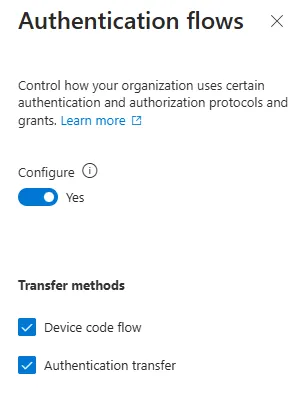
Why you should also disable Authentication Transfer
✅ Benefits of Device Code Sign-In for IoT.
IoT devices often do not have a screen or keyboard to enter login credentials. The Device Code Flow solves this by generating a short code that you enter on another device, such as your phone or computer. This has a number of advantages:
Easy integration: IoT devices can easily log in without having to manually enter login credentials.
User-friendly: Users only need to enter a code on a trusted device, which works quickly and efficiently.
No complex configurations required: No hassle with VPNs or certificates – logging in is approachable.
Handy, right? But there’s a catch….
⚠️ The risks and drawbacks of Device Code Sign-In
While practical, this method also carries security risks:
❌ Less secure authentication: It is more difficult to enforce Multi-Factor Authentication (MFA) with device code sign-in, which increases the likelihood of unauthorized access.
❌ No device management: You have no control over the device being logged in with, which can mean unmanaged devices can access sensitive data.
❌ Potential for phishing attacks: An attacker can trick a rogue device into logging in with a device code without the user realizing it.
In short, without additional security measures, this method poses a risk to corporate data.

Visual explanation of a device code phishing attack, in which a hacker requests a device code, forwards it to the victim and gains access to the account. Source: Microsoft²
Why block in Microsoft Conditional Access?
To mitigate these risks, you can set a Conditional Access policy in Microsoft Entra ID (formerly Azure AD) that blocks Sign-In with Device Code. This ensures:
Increased security – Only managed and secure devices can access corporate data.
Compliance with security policies – Prevents unauthorized or unmanaged devices from connecting.
️ Protection against phishing and fraudulent access – Reduces the likelihood of malicious parties logging in unauthorized.
Also, block Authentication Transfer
In addition to Device Code Flow, it is also wise to disable Authentication Transfer in your Conditional Access policy. This will prevent:
❌ Users can still transfer a session from an unattended device to another device via a workaround.
❌ Conditional Access rules are bypassed, allowing less secure devices to still gain access.
Want complete control over logins? Then disable both Device Code Flow and Authentication Transfer in your policy.
New Cyber Threat: Russian Hackers Abuse Device Code Phishing
Microsoft warns of a new cyber threat involving Russian hackers (Storm-2372) abusing device code phishing to hijack accounts. Multiple sectors have been affected since 2024, including governments, IT, defense and energy companies in Europe, North America, Africa and the Middle East².
Conclusion: to block or not to block?
✔️ For IoT and specific applications, Sign-In with Device Code can be useful, but it must be deployed with policy.
✔️ In standard enterprise environments, it is safer to block this method via Conditional Access.
✔️ Want to use it anyway? Then make sure you have additional security measures such as device compliance and strong MFA rules.
Wondering how your organization can best deploy Conditional Access? Send us a message!
References
¹https://learn.microsoft.com/en-us/entra/msal/java/getting-started/device-code-flow
About the author
My name is Alta Martes, a specialist in Microsoft 365 and Google Workspace, with a focus on modern workplace management, cloud security and identity & access management. With years of experience, I help organizations optimize their IT infrastructure and create a secure, efficient digital workplace.
Need help with your Microsoft 365 strategy?
Click below and find out how we can support your organization:
Want to know more?

Related
blogs

Tech Updates: Microsoft 365, Azure, Cybersecurity & AI – Wekelijks in je Mailbox.