
Knowledge base
August 12, 2026
Cybercriminals don’t take vacations. Your company does.
Every summer, half of the Netherlands shuts down at once. Auto-replies are turned on, laptops are turned off, and caravans are hooked up. Offices are running at half capacity, temporary staff are only partially familiar with the procedures, and messages pile up in inboxes that no one checks for weeks on end.
Attackers know that, too. Not because they’re any smarter than usual, but because the defense is slower. A suspicious payment request is less likely to raise suspicion if the CEO is truly unreachable, and an alert that no one reads isn’t an alert.
In this blog, you’ll learn about five real-life situations where things go wrong during the holiday season, and how to set up your organization so that everyone can take time off without leaving the door wide open.
Why Summer Is the Striker’s Season
The mechanism is simple: fewer people in the office, replacements who aren’t familiar with the procedures, and a response time that stretches from minutes to days. Attackers count on that slow response, and in the summer, they get it. The five situations below are all real-life examples, anonymized, and each could have had a different outcome with a different setup.
The auto-reply that gave too much away
“I will be away through August 3. For invoices, please contact Sandra in the accounting department. For urgent matters, please call our director on his cell phone.” We came across this auto-reply from a newly registered customer. Well-intentioned, but a gift to an attacker: who’s away and until when, who handles payments, the director’s name, and his direct number. Everything needed for targeted invoice fraud, all in a single automated email sent to every unknown sender.
The safe option is free: send a neutral message to external recipients, using only a general email address as a placeholder. Names, dates, and phone numbers should only appear in the internal auto-reply.
The other half of this risk lies within your domain itself: could an attacker send an email that appears to come from your company? Our free Security Check at check.alta-ict.nl assesses this, using SPF, DKIM, and DMARC, among other methods. Let’s be clear from the start: the check assesses the external aspects of your domain and doesn’t resolve any issues on its own. You’ll see the results of the assessment along with an explanation, and it’s up to you to decide what to do with that information.
The payment request from the airport
“I’m at the airport and can’t make a call right now. Can you urgently transfer 14,900 euros to this supplier?” The text message came from an unknown number, but it included the CEO’s name and profile picture. And it was true: the CEO really was at Schiphol that morning. The entire company could have read about it on LinkedIn the Friday before.
The office manager hesitated, called the director’s familiar number, and got him on the line—at the gate. No text message sent, no payment made. That’s how it’s supposed to work, but it’s far from always the case. That’s why we establish the same rule with every client: always verify payments above a certain threshold through a second, known channel. Even when the director is on vacation. Especially then.
The login that doesn’t work
One Tuesday afternoon in the summer: a notification that someone had logged into a customer account from Marbella. It turned out the employee was simply on vacation there, just checking email from the hotel’s network. Fine. Half an hour later, a second notification: same account, logged in from another country, thousands of kilometers away. No one travels that fast.
Conditional Access detected the implausible travel behavior, blocked the session, and forced a password reset—all without anyone having to intervene. That’s the difference between allowing vacation time and allowing abuse: an environment that recognizes travel patterns lets the employee in Marbella work as usual and keeps the attacker out.
All the management know-how in one person’s head—and that person is at a campground
A company with dozens of employees and a single system administrator. He was highly skilled—everything depended on him. He left for three weeks in France, camping in an area with no cell service. In week two, the CRM system crashed. No one had the admin passwords, no one knew which vendor to call, the contract was in his name, and the documentation was all in his head. Four days of downtime—not due to an attack, but because one person was on vacation, as he perfectly well deserved to be.
This is called a single point of failure, and we see it more often in small and medium-sized businesses than we do ransomware. The solution isn’t to hire a second administrator, but to set up the right systems: a password vault with emergency access, a “break-glass” procedure, documentation stored in an easily accessible location, and a third party that can take over if necessary.
The alert that nobody read for eleven days
At a company that later became a client, the security system triggered an alert in late July: a suspicious login, followed by a forwarding rule to an external address. The system did its job and sent a notification as expected—to the IT manager’s email inbox, who was sailing on a boat at the time. The notification was read eleven days later. Eleven days during which every email from the accounting department was forwarded to an external address.
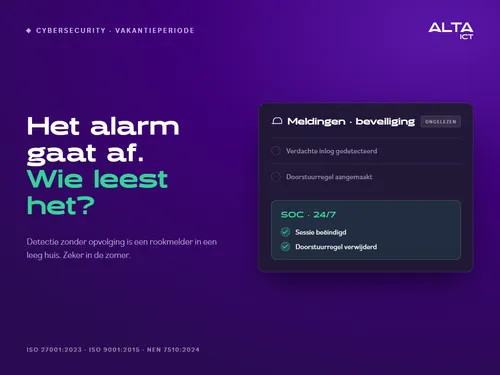
Here’s the truth about security software: detection without follow-up is like a smoke detector in an empty house. It beeps perfectly, but no one comes. That’s why our Premium and Platinum workstations include a SOC that responds 24/7: no alert in an empty inbox, but an analyst who terminates the session and removes the rule—even in the middle of the night, even during the construction industry’s summer break.
Before You Leave: The Quick Checklist
Five things to take care of before packing up the car, in order of increasing difficulty: set the external auto-reply to a neutral tone; establish the verification policy for payments and inform your substitutes; check whether foreign logins are being screened for implausible travel patterns; centralize administrative access using a secure vault and an emergency procedure; and designate who will read and follow up on notifications during the vacation weeks. Only that last question sometimes has no internal answer, and in that case, that’s the honest answer.
If you are subject to the Cybersecurity Act or supply organizations that are subject to it, the holiday season is also a bad time to leave your doors open for a second reason: the questionnaires from the supply chain ask specifically about the points mentioned above.
How ALTA-ICT Handles This Itself
We are an MSP ourselves facing the same summer challenge, and we set up our own environment just as we do for our clients: neutral auto-replies, verification via a second channel, conditional access based on travel patterns, administrative access distributed among multiple users, and monitoring that doesn’t depend on who happens to be in the office. This is documented and verifiable, in accordance with our certifications for ISO 27001:2023, ISO 9001:2015, and NEN 7510:2024.
Frequently Asked Questions
Is my business really a target during the summer, even though we’re a small company?
Yes, that’s exactly when. Attackers aren’t looking for big names, but for slow responses—and they find them during the holiday season at companies of all sizes.
What is the biggest risk of a detailed auto-reply?
He provides an attacker with a step-by-step guide to invoice fraud: who is absent, who pays, and in whose name the email should be sent. Keep the external notification neutral.
How can I prevent CEO fraud if the CEO is truly unreachable?
A fixed rule that does not depend on availability: always verify payments above a certain threshold amount through a second, known channel. The rule provides protection precisely because it applies even if the request appears to come from the director himself.
Should I block foreign logins while I’m on vacation?
No, that makes it impossible to work while on vacation. If you let your environment determine the difference between normal travel behavior and impossible travel behavior, then the employee can work in Spain and the attacker won’t be able to get in.
What if no one internally can follow up on the reports during the vacation weeks?
Well, that’s the honest answer, and it’s exactly the gap that an external SOC fills: an organization that reviews reports and takes immediate action, regardless of vacation schedules.
Conclusion
None of the five situations above required more technology; they required a system that doesn’t depend on who happens to be there. A neutral auto-reply, a verification rule, travel behavior monitoring, administrative access managed by more than one person, and follow-up on reports: together, these make the difference between a business that’s closed and one that’s open.
Would you like to know where your organization stands before the next vacation period? Schedule a short session with ALTA-ICT, and we’ll go over the five points together.
Want to know more?
Related
blogs
![/ Hero Voor Verzenden.html HTML maak synccommanodo Je stuurde de HTML-bron, niet de PNG. Ik heb die HTML zelf gerenderd en het resultaat bekeken. Het beeld is akkoord. Wat ik heb gecontroleerd Maat en fonts: exact 1200x900. Halogen 900 en Bilo 300 en 500 laden uit het bestand zelf, zonder vervangend lettertype. Inhoud: kicker “BLOG · VOOR VERZENDEN”, de kop in wit en limoengroen, en de chatkaart met “dossier” omlijnd en het label “gevoelig”. Er is geen maskering en er staan geen merknamen in. Opmaak: de kop raakt de kaart niet en de certificeringsregel is volledig. Randen: de hoekpixels zijn paars, niet de controlekleur #160a2e. Er is dus geen rand van de pagina mee geëxporteerd. Het PNG-bestand gevoelige-gegevens-ai-chat-verzenden.png heb ik je gestuurd. Zet het in je Downloads en draai dan: powershell cd C:\repos\ALTA-ICT git pull --rebase $b = "docs\Projecten\social-campagnes\Week 43 - Voor Verzenden\Blog" $f = Get-Item "$env:USERPROFILE\Downloads\gevoelige-gegevens-ai-chat-verzenden.png" Add-Type -AssemblyName System.Drawing $i = [System.Drawing.Image]::FromFile($f.FullName); "{0}x{1}" -f $i.Width, $i.Height; $i.Dispose() Copy-Item $f.FullName "$b\" -Force git add -- "$b\gevoelige-gegevens-ai-chat-verzenden.png" git diff --cached --name-only git commit -m "Blog 43: bloghero gevoelige gegevens voor verzenden" git log origin/master..master --oneline Verwachting: 1200x900, dan één bestandsnaam, daarna één of twee commits. Twee commits als de editie 15-hero nog niet gepusht is. Plak de output terug, daarna push je. In WordPress, bij blog 43: Uitgelichte afbeelding: upload dit bestand, met de alt-tekst uit de plakklaar. Controleer na het uploaden dat de bestandsnaam geen -1 heeft gekregen. De kanaalvarianten van blog 43 maak je pas als de blog live staat. De prompt staat in de plakklaar. geef me blog 43 om te maken zoals het moet in wordpress Hieronder staat alles voor WordPress, in de volgorde van de editor. Ik gebruik variant B, zonder test. Plak elke HTML in het tabblad Tekst en schakel nooit over naar Visueel. 1. Nieuw bericht Ga naar Berichten, Nieuw bericht. 2. Titel Gevoelige gegevens in AI-chat, Teams en WhatsApp: het moment vóór verzenden 3. Veld Introductie (tabblad Tekst) html Bij een datalek denk je aan een hacker. In de praktijk begint het vaak met Ctrl+V: een stuk uit een dossier in de verkeerde chat, de verkeerde mail, of een AI-tool die de tekst "even netjes maakt". Er is geen kwade wil. Er is haast, en een knop die te dichtbij zit. Deze blog gaat over dat ene moment vlak voor verzenden: wat kun je dan nog tegenhouden, en wie ziet het? 4. Veld Omschrijving (tabblad Tekst) html Waar Microsoft 365 ophoudt In de blog over Microsoft Purview zag je wat Business Premium al beschermt: mail en de bestanden in OneDrive en SharePoint. Een bestand dat je in Teams deelt, valt daar ook onder. Het chatbericht in Teams niet. DLP voor Teams-chat vraagt volgens Microsoft een E5-licentie. En een AI-chat in de browser of een app op de laptop ziet Microsoft helemaal niet. AI-chat en geheimhouding Een medewerker plakt een brief aan een cliënt in een gratis AI-chat, met zijn privéaccount, om hem beter te formuleren. Naam, adres en de reden van het dossier gaan mee, naar een dienst waarmee je organisatie geen verwerkersovereenkomst heeft. Verbieden werkt slecht. De tool blijft handig, en wie hem niet mag gebruiken, gebruikt hem stiekem. Beter: weten welke AI-tools je team gebruikt, en per tool afspreken wat erin mag. WhatsApp is geen dossier De wijkverpleegkundige stuurt een foto naar de collega die de dienst overneemt. De installateur appt de klant een offerte met diens adres. Het werkt snel, en het gebeurt vaak op een privételefoon. Daarmee staan zakelijke gegevens op een apparaat dat de organisatie niet beheert, in een app die ze niet kan archiveren. Vertrekt de medewerker, dan vertrekken de gesprekken mee. Een alternatief moet net zo snel zijn, anders gebruikt niemand het. Een waarschuwing op het juiste moment Een training over datalekken vergeet je in een week. Een melding op het moment van verzenden niet. In Outlook kan Microsoft 365 dat al: staat er een gevoelig gegeven in een mail, dan verschijnt bovenaan een melding nog voor de mail vertrekt. Voor chat en voor apps buiten Microsoft heb je daarvoor software op het apparaat nodig. Beschermen zonder meekijken Elke vorm van datalekpreventie roept bij medewerkers en ondernemingsraad één vraag op: leest de werkgever mee? Stel die vraag zelf, vóór je iets kiest. Een melding per soort gegeven is genoeg om een lek te voorkomen. Namen en berichtinhoud zijn daarvoor niet nodig. Begin met een AI-overzicht Je hoeft niet met software te beginnen. Begin met een lijst van de AI-tools die je team gebruikt, waarvoor, en met welke gegevens. Vaak staan er tools op die niemand had verwacht. De Europese AI-verordening legt de markering van AI-output bij de aanbieders. Sinds augustus moeten zij wat hun AI maakt machineleesbaar markeren; voor tools die al eerder op de markt waren, loopt de overgang tot 2 december. Dat is hun plicht. Jouw taak is weten wat je gebruikt. Het AI-Register geeft geen juridisch oordeel. Wel maakt het in ongeveer tien minuten een overzicht van je AI-tools met de transparantieteksten, als drie documenten in je mail. Zo doen wij het We beginnen met het AI-overzicht en de afspraken per tool. Daarna zetten we Purview aan voor mail en bestanden. Het gat buiten Microsoft vullen we met datalekpreventie op het apparaat, als add-on bij de moderne werkplek. We werken zelf onder ISO 27001:2023, ISO 9001:2015 en NEN 7510:2024. Veelgestelde vragen Mag een medewerker een AI-chat gebruiken voor werk? Dat bepaal je zelf, per tool. Leg vast welke tools mogen en welke gegevens er niet in horen. Een zakelijk abonnement met een verwerkersovereenkomst is iets anders dan een gratis versie met een privéaccount. Beschermt Business Premium Teams? Bestanden die je in Teams deelt wel, want die staan in SharePoint of OneDrive. Het chatbericht zelf niet; daarvoor vraagt Microsoft E5. Moet ik AI-output zelf markeren? De markering van AI-output is een plicht van de aanbieder van de AI-tool. Voor jou telt dat je weet welke tools je gebruikt en wat je erin stopt. Conclusie Het lek begint met plakken, niet met een hacker. Microsoft 365 beschermt mail en bestanden; de chat, de AI-tool en de app op de laptop vallen erbuiten. Begin met een overzicht van wat je team gebruikt en spreek per tool af wat erin mag. Wil je het moment vóór verzenden bespreken? Plan een gesprek met ALTA-ICT. 5. CTA-knop (als je thema een knopveld heeft) Tekst: Het moment vóór verzenden bespreken Link: https://alta-ict.nl/contact?utm_source=blog&utm_medium=referral&utm_campaign=voorverzenden&utm_content=blog43-cta 6. Uittreksel Een datalek begint vaak niet bij een hacker, maar bij plakken. Wat er gebeurt als een medewerker gegevens in een AI-chat, een Teams-chat of WhatsApp zet, waar Microsoft 365 ophoudt, en waarom je begint met een overzicht van de AI die je team gebruikt. 7. Categorie: Beveiliging. Zet geen andere categorie aan. 8. Uitgelichte afbeelding Upload gevoelige-gegevens-ai-chat-verzenden.png. Controleer daarna dat de bestandsnaam in de mediabibliotheek geen -1 heeft gekregen. Alt-tekst: Hero bij de blog over gevoelige gegevens vóór verzenden: een chatinvoerveld met de zin Hierbij het dossier van de cliënt, waarin het woord dossier omlijnd is en gemarkeerd als gevoelig.](/media/uploads/2026/10/gevoelige-gegevens-ai-chat-verzenden.png?width=600 "Sensitive Information in AI Chat, Teams, and WhatsApp: The Moment Before Sending")
Tech Updates: Microsoft 365, Azure, Cybersecurity & AI – Wekelijks in je Mailbox.