
Knowledge base
January 31, 2025
Administrator Protection in Windows 11: What you need to know
Windows 11 continuously introduces new security features to support IT administrators and make systems more secure. One of these enhancements is Administrator Protection¹, designed specifically to protect accounts with elevated privileges from attack and abuse. But what exactly does this mean? In this blog, we dive into the details.
Why is Administrator Protection important?
Administrative accounts are a favorite target for hackers because they provide access to sensitive systems and data. Without proper protection, these accounts can be easily abused, with serious consequences such as:
- Ransomware attacks
- Unauthorized access to sensitive data
- System instability due to unwanted changes ⚙️
️ How does Administrator Protection work in Windows 11?
Microsoft has built in several mechanisms to better secure administrator accounts:
- Limiting local admin rights:
- Admin rights are granted only when absolutely necessary, reducing the risk of abuse.
- Tip: Use a standard account for daily use and only an admin account for specific tasks.
- Secured-core PCs:
- Windows 11 works seamlessly with devices that are “Secured-core,” meaning that hardware and software security go hand in hand.
- Multilayer verification:
- Multi-Factor Authentication (MFA) is crucial to make access to admin accounts extra secure.
- Good to know: Windows 11 integrates perfectly with Microsoft Authenticator.
- Management via Microsoft Intune:
- Use Intune to enforce central policies, such as restricting access to sensitive functions.
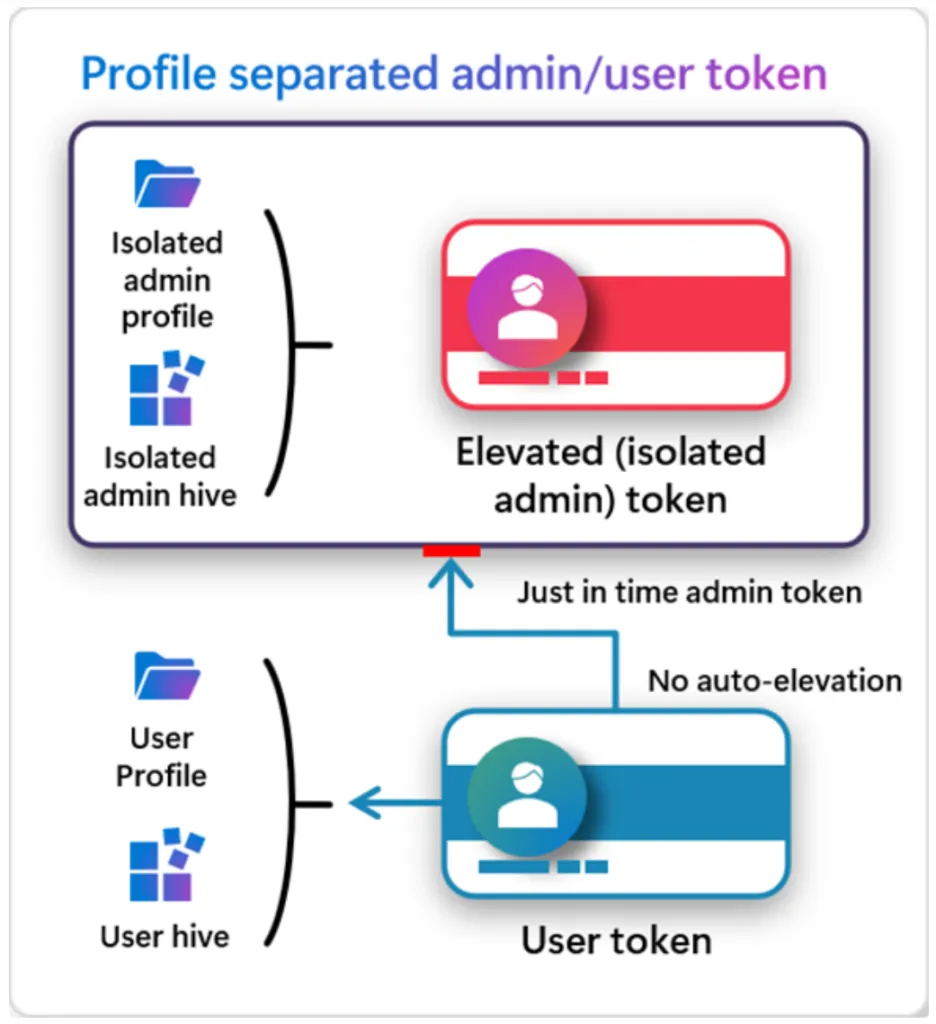
Architecture of Administrator Protection. Source: Microsoft
️ Best Practices for IT Administrators
Want to take maximum advantage of these security features? Here are a few tips:
- Use the principle of least privilege (PoLP): Give users only the rights they need.
- Implement Zero Trust security: Don’t trust any user or device without authentication.
- Monitor actively: Use tools such as Microsoft Defender to detect suspicious activity.
- Enable Credential Guard: Protect credentials with hardware isolation.
What are the benefits to your organization?
With these new security features, Windows 11:
- Increased protection against attacks ️
- Simpler management for IT administrators ⚙️
- Better regulatory compliance ✅
- Reduced downtime due to security incidents
Conclusion
Administrator Protection in Windows 11 is a powerful step forward in securing critical accounts and systems. By using built-in tools and following best practices, you can protect your organization from modern threats. Take action and make your IT environment more secure!
References
About the author
My name is Alta Martes, a specialist in Microsoft 365 and Google Workspace, with a focus on modern workplace management, cloud security and identity & access management. With years of experience, I help organizations optimize their IT infrastructure and create a secure, efficient digital workplace. Need help with your Microsoft 365 strategy?
Click below and find out how we can support your organization:
Schedule a no-obligation consultation
Want to know more?

Related
blogs


Tech Updates: Microsoft 365, Azure, Cybersecurity & AI – Wekelijks in je Mailbox.